Skip to content
Minecraft New Items.
ItemsMods & Add-onsCompatibilityGuidesUpdates
Find your next mod
ItemsMods & Add-onsCompatibilityGuidesUpdates
Minecraft New Items.

A little curiosity. A whole new world.
Your next Minecraft discovery starts here.

DiscoverNew itemsMods & add-onsCompatibility checker
Get to know usAbout Minecraft New ItemsSources & editorial policyPrivacy policy
Built for curious players.

Original artwork. Traceable sources.
Community at the heart of it.

This is an independent Minecraft resource discovery platform. It is not affiliated with or endorsed by Mojang or Microsoft.

© 2026 Minecraft New Items
  1. Home
  2. Guides
  3. How to Install Minecraft Throwing Disc Mods
Installation

How to Install Minecraft Throwing Disc Mods

Choose a verified community recreation for your edition.

5 min readUpdated Nov 17, 2026
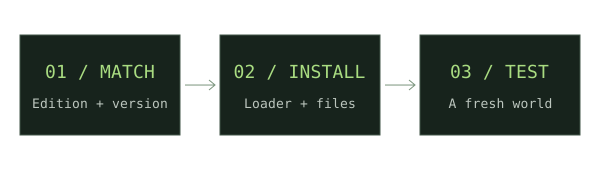
Three stages: match edition and version, install loader and files, test a fresh world
Original installation workflow diagram. Follow the specific steps below.
  1. Understand the status

    The official Throwing Disc is announced. The downloads in this catalog are independent community implementations, with potentially different mechanics.

  2. Choose Java or Bedrock

    Java players need a matching loader build. Bedrock players need an add-on package. Use the checker to narrow the catalog.

  3. Open the release source

    For Pokato’s project, inspect the separate Fabric, Forge, and NeoForge files. For CadenceDev’s add-on, inspect the Bedrock file listing.

  4. Install in a test setup

    Follow the Fabric, Forge, or Bedrock guide linked below. Check the original author’s dependencies before launching.

  5. Verify behavior

    Test the mod in a new world. Treat its recipes, enchantments, damage, and return behavior as mod-specific.

If something does not work

No exact matching file in the checker means Unknown. Do not use the official item’s planned release window as evidence that a mod supports your game.

i

For new weapon downloads, start with our Minecraft Throwing Disc field guide, then compare Pokato’s Java mod and CadenceDev’s Bedrock add-on against your setup.

Sources & verification

Primary sources take priority. A listed source establishes declared support; it is not an in-game test.

Community projectThrowing Disc by PokatoCurseForge / Pokato · Verified Nov 17, 2026Community projectThrowing Disc - Early AccessCurseForge / 178Mosko · Verified Nov 17, 2026Community projectThrowing Disc & OffhandCurseForge / CadenceDev · Verified Nov 17, 2026
IN THIS GUIDE1. Understand the status2. Choose Java or Bedrock3. Open the release source4. Install in a test setup5. Verify behaviorOpen compatibility checker →

Keep exploring.

01Original voxel illustration of mace
Getting started

How to Install Minecraft Mods

Start with the right edition, version, and loader. Then build a clean, reproducible mod setup.

4 min read
02Original voxel illustration of a throwing disc
Installation

How to Install Fabric Mods

A short path from a clean Java profile to your first Fabric mod.

4 min read
03Original voxel illustration of mace
Installation

How to Install Forge Mods

Choose a Forge build and mod file that agree on the exact Minecraft release.

4 min read