Start with a mod list
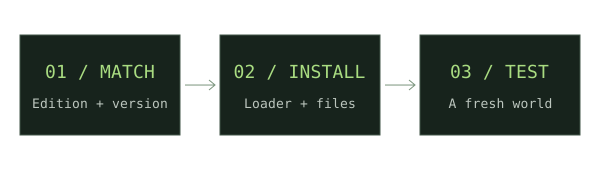
List the projects you actually need. Check the original release files for each project before choosing a loader.
Compare overlapping support
Find a Minecraft version and loader that every required mod explicitly supports. Similar version numbers alone are insufficient.
Keep loader families separate
Fabric, Forge and NeoForge are separate ecosystems. A project with multiple ports still publishes distinct builds.
Consider the whole instance
Check required libraries, client/server placement, and the Java runtime for the chosen game version.
Create one profile per setup
Maintain separate directories for different loaders. Test the chosen group in a fresh world before moving a save.
If something does not work
There is no universal best loader. Choose the supported combination that fits your required projects, and keep a copy of the working file list.
For new weapon downloads, start with our Minecraft Throwing Disc field guide, then compare Pokato’s Java mod and CadenceDev’s Bedrock add-on against your setup.
Sources & verification
Primary sources take priority. A listed source establishes declared support; it is not an in-game test.
Developer documentationInstalling mods — Fabric player documentationFabricMC · Verified Nov 17, 2026Developer documentationMinecraft Forge downloadsMinecraft Forge · Verified Nov 17, 2026Developer documentationNeoForge installers and documentationNeoForged · Verified Nov 17, 2026